Slime Room: Retro Platform Adventure
Reviews
💡Slime Room: Retro Platform Adventure captures the essence of classic arcade platformers with its pixel art and inventive level gimmicks. The controls are responsive, and the lack of time limits allows for thoughtful play. Each stage introduces new obstacles, keeping the experience fresh. It is a free, family-friendly game that offers a satisfying mental challenge without any inappropriate content.
Description
Game Introduction
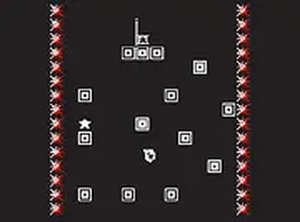
Slime Room: Retro Platform Adventure is a classic arcade-style game that brings back the feel of old-school platform challenges. You control a small, sticky slime as it moves through a series of stages filled with clever traps and obstacles. The game uses pixel-style graphics that look simple but create a charming world. Each level introduces new gimmicks that change how you play. Some stages have moving platforms, others have gaps you must jump over. The goal is to reach the finish point in every stage without falling or getting caught. The game is designed for desktop play and works best with a keyboard. You can also switch to full screen mode for a more focused experience. Slime Room is free to play and offers a fair challenge for players of all ages. It is a good choice for anyone who enjoys timing-based puzzles and retro aesthetics.
How to Play
To play Slime Room, use your keyboard to control the slime. The arrow keys or WASD keys move the slime left, right, and jump. Press the jump key to leap over gaps and avoid obstacles. Each level has a clear start and finish point. Your task is to guide the slime from the start to the goal without failing. Watch the environment carefully. Some obstacles move, and some gimmicks can help you if used correctly. For example, you might find springs that launch the slime higher or blocks that disappear after a moment. Take your time to learn each stage. There is no time limit, so you can plan your moves. The game is best played on a desktop computer with a keyboard or mouse. Full screen mode gives you a larger view of the level. Practice each stage until you master the timing. The controls are responsive and easy to learn.
Game Features
Game features include: Challenging levels with tricky obstacles and fun gimmicks. Pixel-style graphics that look clean and nostalgic. Simple keyboard controls that are easy to learn. Free to play with no hidden costs. Full screen mode for a better view. No violence or inappropriate content. Suitable for players of all ages.
Tips for Success
Slime Room offers a fair challenge that respects your time. The levels are short but require focus. The retro style is pleasing without being distracting. It is a good game to play during a break or when you want a quick mental workout. Practice regularly to improve your timing and learn each stage's unique layout.
Compatibility
Faq
Is Slime Room: Retro Platform Adventure available on mobile devices?
Does Slime Room require an internet connection to play?
How many levels are in Slime Room: Retro Platform Adventure?
Can I save my progress in Slime Room?
Is there a leaderboard or high score system in Slime Room?
What should I do if the game controls are not working?
Recommended Games

Tunnel Runner 3D Challenge

Rolling Donut Bounce Runner

Mine Runner: Endless Arcade Runner

City Rooftop Runner Parkour Arcade

Tap Speed Racing Online

Nubik Sky Motorcycle Adventure

Fishing Quest Arcade Game

Pastel World Fashion Explorer
Ancient Path Runner