Stellar Frontier Guardian
Reviews
Stellar Frontier Guardian succeeds by combining straightforward action with meaningful strategic depth. The procedurally generated maps ensure that each session feels fresh, while the clone system provides a safety net that encourages bold play without punishing failure too harshly. The controls are responsive, and the desktop optimization makes for a smooth experience. The game's simplicity is its strength, offering a satisfying loop of exploration, combat, and adaptation that keeps you coming back for one more mission.
Description
Core Mission Structure
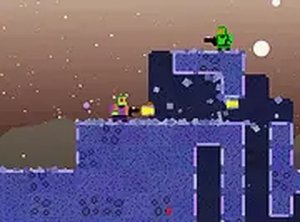
Stellar Frontier Guardian places you in the role of a planetary defender tasked with repelling an extraterrestrial invasion. Each mission sends you to a different procedurally generated planet where enemy outposts must be located and neutralized. The layout of each world changes with every playthrough, requiring you to assess new terrain and adjust your approach on the fly. Objectives are clearly presented at the start of each mission, and completing them advances the overall campaign. The game's structure encourages repeated playthroughs, as no two missions feel identical due to the random generation of environments and enemy placements.
Control Scheme and Desktop Optimization
The game is designed exclusively for desktop computers, utilizing keyboard and mouse inputs for precise movement and targeting. Players navigate their character through 2D or isometric environments, using the mouse to aim at distant targets and the keyboard to move and dodge incoming attacks. The controls are responsive and intuitive, allowing for quick reactions during intense encounters. Full-screen mode is supported to enhance immersion, and the interface is streamlined to keep focus on the action. Because the game runs directly in a web browser, there is no need for downloads or installations, making it accessible from any compatible computer.
Clone System and Progression
A distinctive feature of Stellar Frontier Guardian is its clone system, which provides a safety net during missions. Players begin each campaign with a limited number of clones. When the primary character is defeated, a clone is deployed to continue the mission from the last checkpoint. After successfully completing a mission, the clone count is replenished, allowing for sustained progress even after setbacks. This system reduces frustration and encourages experimentation with different strategies, as failure does not force a complete restart. The clone mechanic adds a layer of resource management, as players must decide when to take risks and when to play conservatively to preserve their available clones.
Strategic Adaptation and Replay Value
The procedurally generated maps are the cornerstone of the game's replayability. Each new game generates a unique arrangement of obstacles, enemy bases, and resources, ensuring that memorization alone cannot guarantee success. Players must develop flexible strategies that account for varying terrain and enemy density. Some planets may feature open areas that favor ranged combat, while others might have tight corridors requiring close-quarters maneuvering. The random generation also affects the placement of objectives, so planning a route becomes a dynamic puzzle. This variety keeps the gameplay fresh and encourages multiple playthroughs to experience different planetary configurations.
Visual and Audio Atmosphere
While the game runs in a browser, it presents a visually engaging space-themed aesthetic. Planets are rendered with distinct color palettes and environmental details that differentiate one world from another. The user interface is clean and unobtrusive, displaying health, clone count, and mission objectives without cluttering the screen. Sound effects accompany actions such as movement, aiming, and completing objectives, providing audio feedback that enhances the sense of presence. The overall presentation is functional and appealing, focusing on clarity and gameplay rather than elaborate cinematics. This approach ensures smooth performance even on older hardware.
Tips for New Players
Newcomers should spend the first few missions familiarizing themselves with the movement and aiming mechanics. Because maps are randomly generated, practicing situational awareness is crucial. Identify high-priority targets early and use environmental cover to minimize damage. Avoid unnecessary confrontations that could deplete clones without advancing objectives. After each mission, review the layout of the next planet in the brief screen to plan an initial route. Regular practice improves reflexes and accuracy, and trying different tactical approaches can reveal effective strategies for various planetary types. The clone system allows for mistakes, so use it as a learning tool rather than a crutch.
✅ Compatibility & Testing
Faq
Is Stellar Frontier Guardian free to play?
What kind of computer do I need to play Stellar Frontier Guardian?
How does the clone system work in Stellar Frontier Guardian?
Can I play Stellar Frontier Guardian on a mobile device or tablet?
What makes each playthrough different in Stellar Frontier Guardian?
Are there any tips for beginners playing Stellar Frontier Guardian?
More Like This

Sprunki Chamber Runner Arcade Adventure
Candy Forest Arcade Adventure
Forest Mouse Life Sim Adventure

City Drive: Open World Exploration

Lab Runner Adventure

Ocean Nomad: Raft Survival Adventure
Physics Playground Sandbox Adventure

Mega Ramp Racing Challenge
Yoko Adventure Platformer

Comments
0 comments